
Three things separate a remote support tool you can trust from one you merely tolerate: how fast it performs under real conditions, how strongly it encrypts every session, and how cleanly it scales as you add technicians and devices. Judged on those three axes side by side, Splashtop comes out ahead of this field, which is why it leads the five leading remote support software reviewed here. It pairs 4K low-latency performance with TLS and 256-bit AES encryption and scales through per-technician licensing that covers up to 300 endpoints, without forcing a trade-off between speed and security.
That security focus is not optional. Remote support tools sit directly on other people’s machines, and attackers know it, which is why understanding how encryption works matters as much as any feature checklist. This review evaluates each platform on performance, encryption, and scalability, then adds a buyer’s checklist so you can match a tool to your own threat model. (Internal link: see nothing2hide.net’s guides on [digital security for journalists].)
How These Tools Were Evaluated
Each platform below is measured against the same criteria, weighted toward security:
- Performance: Frame rate, latency, and connection stability, including behavior over weak or congested networks.
- Encryption: End-to-end encryption, cipher strength (AES-256 versus lighter options), and key exchange, the core of the fundamentals of encryption.
- Scalability: Concurrent-session capacity, endpoint limits per license, and deployment flexibility across cloud, on-premises, and private cloud.
- Access controls: Multi-factor authentication, role-based permissions, and session logging.
- Platform coverage: Support across Windows, Mac, Linux, and mobile.
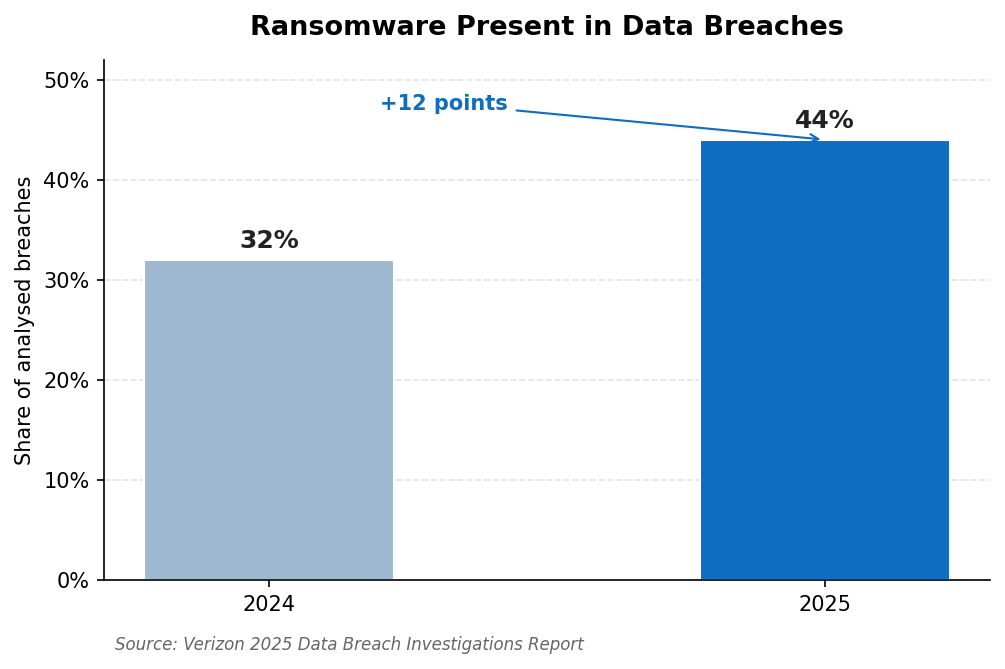
Ransomware now appears in 44% of analyzed breaches, up from 32%, a reminder that the encryption and access controls on your remote tools are a frontline defense. Source: Verizon 2025 DBIR.
Leading Remote Support Software Compared
|
Tool |
Encryption |
Performance |
Scalability and Deployment |
|
1. Splashtop |
TLS + AES-256, MFA |
4K/60fps, low latency |
Per technician, up to 300 endpoints, cloud |
|
2. ISL Online |
AES-256 end-to-end, ISO 27001 |
Fast direct connections |
Cloud, on-premises, private cloud |
|
3. SetMe |
AES-256, unique key per session |
Fast, low lag |
No device or session limits, cloud |
|
4. Getscreen.me |
AES-128 in WebRTC + SSL |
Browser-based |
Cloud, quick to scale |
|
5. TsPlus Remote Support |
TLS, self-hostable |
Web-based sessions |
Self-hosted or cloud, per technician |
The 5 Leading Remote Support Platforms Reviewed
1. Splashtop – Balanced Performance, Encryption, and Scale
Splashtop is the most balanced performer across all three axes. On performance, sessions stream at up to 4K and 60 frames per second with low latency, so troubleshooting stays responsive even on weak connections. On encryption, it secures every session with TLS and 256-bit AES plus multi-factor authentication and session logging. On scalability, it licenses per concurrent technician with up to 300 endpoints per license, supports Windows, Mac, Linux, iOS, and Android, and holds SOC 2 Type II, ISO 27001, and HIPAA credentials. Attended sessions start from a 9-digit code, while unattended access covers managed devices.
For teams weighing the leading remote support software reviewed in this guide, Splashtop is the most complete option, and you can explore it and open a free trial there.
“The connections are fast, plenty of options that actually work, turning the speed option on actually makes a difference on a slow connection.” Verified User, Capterra (Splashtop holds 4.7/5 from 700+ reviews)
Pros:
- Strong on all three axes at once
- 4K, low-latency performance and AES-256 encryption
- Scales per technician with broad compliance coverage
- Cross-platform attended and unattended support
Cons:
- No built-in voice chat, only text chat
- Advanced endpoint management is a paid add-on
Best for: Teams that want performance, encryption, and scalability without compromise.
Contact: Website: https://www.splashtop.com HQ: Cupertino, California, USA
2. ISL Online – Encryption Depth and Deployment Flexibility
ISL Online is built for organizations that treat encryption and data residency as non-negotiable. It secures sessions with AES 256-bit end-to-end encryption, RSA 2048/4096-bit key exchange, and TLS 1.3, and it is certified under ISO/IEC 27001:2022. Crucially for scalability and compliance, it offers cloud, on-premises, and Managed Private Cloud deployment, so regulated organizations can keep all session data on their own infrastructure. It runs across Windows, Mac, Linux, and mobile without VPN or firewall changes.
Pros:
- AES-256 end-to-end encryption and ISO 27001 certification
- Cloud, on-premises, and private cloud deployment
- Two-factor authentication, RBAC, and audit logs
Cons:
- Interface feels more utilitarian than newer rivals
- On-premises setup adds administrative overhead
Best for: Regulated organizations that need data sovereignty and deep encryption.
Contact: Website: https://www.islonline.com HQ: Ljubljana, Slovenia
3. SetMe – Per-Session Encryption With No Hard Limits
SetMe takes a privacy-first approach: every session gets a unique AES-256 encryption key, generated via Elliptic-Curve Diffie-Hellman, so no shared key is reused across sessions. It adds two-factor authentication, multi-monitor support, drag-and-drop file transfer, and session recording, and it imposes no device or session limits, which keeps scaling predictable. It is cloud-native and runs on Windows, Mac, and the browser.
Pros:
- Unique AES-256 key per session
- No device or session limits
- Privacy-focused with no tracking
Cons:
- Smaller platform coverage than incumbents
- Fewer enterprise integrations
Best for: Security-conscious teams that want strong per-session encryption.
Contact: Website: https://set.me Developer: Techinline Ltd. (Canada)
4. Getscreen.me – Browser-Based Convenience
Getscreen.me runs entirely in the browser, so technicians start sessions without installs and without opening firewall ports on the managed device. Transmitted data is encrypted with AES-128 inside WebRTC and SSL by default, which is lighter than the AES-256 used by the platforms above and worth weighing if you handle highly sensitive data. It adds two-factor authentication, IP whitelisting, and SSO, and each agent build is checked on VirusTotal.
Pros:
- No installs or firewall changes needed
- Quick to deploy and scale
- Two-factor authentication and IP whitelisting
Cons:
- AES-128 default is lighter than AES-256 rivals
- Browser model suits lighter use cases
Best for: Teams that prioritize fast, install-free browser sessions.
Contact: Website: https://getscreen.me
5. TsPlus Remote Support – Self-Hostable and Affordable
TsPlus Remote Support delivers attended and unattended remote assistance through the browser, with the option to self-host for teams that want to keep infrastructure in-house. Sessions are secured over TLS, and pricing is a predictable flat per-technician rate that scales without per-endpoint penalties. It is a practical, budget-conscious choice that covers core support tasks like screen sharing, remote control, chat, and file transfer.
Pros:
- Self-hosting option for in-house control
- Flat, predictable per-technician pricing
- Straightforward web-based sessions
Cons:
- Lighter feature depth than full platforms
- Windows-centric focus
Best for: Budget-conscious teams that want a self-hostable support tool.
Contact: Website: https://www.tsplus.net
Pre-Purchase Checklist
Before committing to any tool on this list, confirm the following against your own requirements:
- Encryption strength: Does it use end-to-end AES-256, or a lighter cipher like AES-128?
- Key exchange and authentication: Are strong key exchange, multi-factor authentication, and role-based permissions in place?
- Performance under stress: Does it stay usable on weak or congested networks, not just ideal ones?
- Deployment fit: Can you deploy cloud, on-premises, or private cloud if data sovereignty matters?
- Scaling model: Are concurrent-session and endpoint limits, and the pricing model, aligned with how you will grow?
- Platform coverage and logging: Does it cover your operating systems and produce exportable session logs?
Trial any shortlist across real devices and your weakest connections before you commit.
FAQs
- What encryption should leading remote support software use? End-to-end AES-256 is the standard to look for, paired with strong key exchange such as RSA or Elliptic-Curve Diffie-Hellman and enforced multi-factor authentication. Some tools default to lighter AES-128 or rely only on transport encryption, which is worth weighing if you handle sensitive data.
- How should I evaluate remote support performance? Test frame rate and latency on poor connections, not just ideal ones, since that is where weak tools fall apart. A platform that holds up at 4K and 60 frames per second with low latency over a congested network will feel reliable everywhere else.
- What makes remote support software scalable? Scalability comes from concurrent-session capacity, endpoint limits per license, deployment flexibility across cloud and on-premises, and a pricing model that does not penalize growth. Per-technician pricing with generous endpoint coverage tends to scale most predictably.
- Why does Splashtop top this list? Splashtop balances all three axes at once: 4K low-latency performance, TLS with 256-bit AES encryption and multi-factor authentication, and scalable per-technician licensing covering up to 300 endpoints, backed by SOC 2 Type II, ISO 27001, and HIPAA. Few tools score this well across performance, encryption, and scale together.
- Can Splashtop be deployed securely for sensitive environments? Yes. It combines AES-256 encryption with multi-factor authentication, granular permissions, and session logging, and holds SOC 2 Type II, ISO 27001, and HIPAA credentials, which suits regulated and security-conscious teams.
The Bottom Line
Among the leading remote support software reviewed here, Splashtop is the standout, balancing 4K performance, AES-256 encryption, and scalable per-technician licensing better than the rest of the field. ISL Online and SetMe are strong on encryption depth and deployment flexibility, Getscreen.me wins on browser convenience with lighter AES-128, and TsPlus Remote Support suits self-hosted, budget-conscious teams. Ready to evaluate it yourself? Trial Splashtop across a sample of devices, test performance on your weakest connections, and verify its certifications against your security requirements.
More Stories
GPS Tracker for a Senior With Dementia Who Still Drives
How Residential Proxies Improve the Reliability of Web Scraping Systems
How to Choose a US Dedicated Server Region for National Reach